|
Main menu |
News |
| Key Features |
| User Interface |
| Download |
| Comparison Chart |
| Purchase |
| Vânzări în România |
| F.A.Q.
|
| Supported Devices |
| ATI Theater 550 |
| Hauppauge Cards |
| Forum |
| Links |
| Pad Files |
Contact
|
|
Bookmark this page |
|
| ChrisTV Awards |



|
|
|
| Useful Tools |

|
 |
 |
|
Old ChrisTV News and Announcements ...
|
12 July 2006
|
Version 4.95 ( 12 July 2006 )
- Added the option to create a new scheduled task (duplicate) using the information from a previous defined task.
- When setting a scheduler task only the favorite channels will be displayed in the channels list.
- For a better usage you can set date and duration for scheduled task using the mouse wheel.
- Fixed image quality and video standard setting for some capture devices which were caused by a wrong country setting.
- Fixed sound muting issues on ChrisTV start on systems with more than one sound card.
- Fixed image capture shortcut to work with Composite and S-video input, not only TV.
- Improved FFDShow support for MPEG Hardware Encoding TV cards with Live Preview mode enabled.
- Improved sound mode settings for Hauppauge PVR cards.
- Other small fixes and improvements.
|
|
9 March 2006
|
Version 4.90 ( 9 March 2006 )
- We have added full support for Hauppauge HVR 900 (analog), HVR 1100 (analog) and HVR 1300 (analog) TV cards.
- ChrisTV Configuration Wizard has been improved and optimized in order to help you configure ChrisTV easier and faster to work smoothly with your capture device. Just select the appropriate capture device from the list and you'll be ready to enjoy ChrisTV PVR.
- Updated support for ATI Theater 550 PRO latest driver and fixed frame size setting bug for recording mode.
- Added support for TV-Browser - TV guide software, so you can add/delete scheduled recordings directly from TV-Browser, for more details about the configuration steps, please check our forum.
- Added Closed Captions feature and improved european teletext support.
- Better video quality for TimeShifting feature and Preview mode when TV Card MPEG Hardware Encoder is used.
- MPEG Hardware Encoder detection has been improved for systems that have more than one TV card with MPEG Hardware Encoder.
- Support for USB capture devices has been improved : Pinnacle PCTV USB2, PCTV 100e, TerraTec Cinergy 200/250 USB, Cinergy Hybrid T USB XS (analog), Prodigy Hybrid TV USB (analog), Hercules Smart TV USB2, GoodWay USB 2.0 CuteBox.
- Support for FFDShow has been improved and also you can set which FFDShow filter preset should be applied to the video preview.
- Optimized video and audio initialization on ChrisTV launch.
- Fixed AVI recording and MPEG recording problems for some software TV cards.
- Fixed video rendering problems for capture devices that have only video capture pin.
- Fixed some recording settings option for Hauppauge PVR 150 and Hauppauge PVR 500.
- Improved and optimized force country change according to video standard feature.
- Added the option to fix sound quality for preview mode (if sound is choppy) when using audio renderering device.
- Some improvements in scheduler settings window.
- Other small fixes and improvements.
|
|
8 December 2005
|
Version 4.80 ( 8 December 2005 )
- We have added support for Hauppauge HVR 1100 TV card analog, for more details on how to configure it, check our forum.
- We have improved the support for ATI Theater 550 PRO TV cards.
- Added the option to fix sound quality for some TV cards with MPEG Hardware encoder (like ATI Theater 550 PRO, Hauppauge PVR 150/250/350/500) which might have problems : choppy sound or no sound in preview when "Live Preview Mode" is disabled or while making recordings with low video bitrates.
- Optimized ChrisTV Agent and Scheduler to work better on Windows ME and Windows 2000.
- ChrisTV now detects automatically if the Audio of your TV card is streamed digitally (via the PCI-bus or the I2S-bus and no loopback sound cable is needed) during wizard configuration.
- In order to improve the scheduler usage we have added "Next Recording Date" field, so you can see when the scheduled task will take place.
- The advanced driver settings panel has been reorganized for a better usage.
- Added the option to render the sound using the WDM audio rendering devices (for Hauppauge HVR 1100 and other similar TV cards).
- Fixed Teletext and Image capture problem for some TV cards in ChrisTV Lite.
- Fixed sound mode detection when using Composite or S-Video inputs.
- Added the option to improve ChrisTV channel list loading time (works only on some systems).
- Fixed sound initialization for some tv cards when using normal video renderer.
- We have optimized the frequency retune option.
- Added the option to fix Teletext initialization on WinXP Media Center Edition.
- Other small fixes and improvements.
|
|
19 September 2005
|
Version 4.70 ( 19 September 2005 )
We are glad to bring you ChrisTV Professional and Standard version 4.70 with full support and advanced features for the ATI Theater 550 PRO TV Cards :
- Live Preview Mode. Using this mode you will have low CPU usage and you can use deinterlace filter and FFDShow filter to improve image quality.
- TimeShift feature using the TV card MPEG Hardware Encoder.
- MPEG2 recording module offers access to advanced recording settings :
- fast recording presets,
- constant/variable video bitrate,
- average and peak video bitrate,
- frame size,
- audio bitrate,
- audio samplerate,
- MPEG2 GOP format and size,
- and more...
- Video processing features, including a 3D comb filter.
- Advanced automatic channel scan engine.
- More details you can find on this page.
You can now be notified before a scheduler task takes place with balloon hints. You can choose to display scheduler task information : task name, channel name, duration, recording mode :

Optimized support of FFDShow filter for software capture devices.
Improved detection of TV Cards with MPEG2 Hardware Encoder.
Optimized the TVgenial support in ChrisTV.
Fixed the teletext initializing problem when using Windows XP or DirectX 9 in other language than english.
Improved and optimized the Timeshift buffering engine for some capture devices.
Fixed some recording settings for blackbird TV cards.
Other small fixes and improvements.
|
|
18 August 2005
|
Version 4.60 ( 18 August 2005 )
- Added support for FFDShow DirectShow postprocessing filter to improve image quality and more. You can apply this feature in preview mode and live preview mode.
- You can customize MPEG Hardware Encoder settings ( like : Stream type, Video Bitrate, Audio Bitrate, Video Frame Size etc.) for TV Cards with Blackbird and Falcon Conexant Chipsets :
- Leadtek PVR 2000
- Prolink Pixelview PlayTV@P7000
- Provideo PV258 Series and others.
- You can use the Image Prefilter settings for Hauppauge PVR 150/250/350/500, TV Cards with Blackbird chipset Leadtek PVR 2000, Pixelview PlayTV@P7000 and others.
- Added basic support for Capture Devices with WIS GO7007SB Chip, Plextor ConvertX PVRs.
- Improved and optimized Timeshift feature for software Capture Devices.
- Scheduler Window has been redesigned for a better usage :
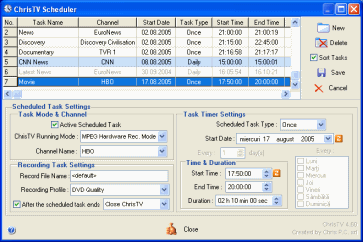
- You can have access to all tasks information at once.
- Scheduler Tasks can be ordered by the time of occurrence.
- The disabled scheduler tasks are marked.
- The next scheduler task that should take place has a colored mark.
- Radio Recording for TV Cards with MPEG Hardware Encoder is available if Live Preview is enabled.
- ChrisTV Settings panel has been reorganized for easier access and better usage.
- You can set the Aspect Ratio Mode for Overlay and VMR9 video rendering modes between :
- streched ( no aspect ratio correction )
- letter box ( letter box the video, and the background color will be black in the excess region )
- crop ( crop the video to the right aspect ratio )
- Added the feature to control the preview sound level using DirectX Audio interface when "Use TV Card Audio Output through the PCI-bus (instead of Line IN)" option is enabled so it won't affect the Wave volume.
- Fixed some recording settings option for Hauppauge PVR 150/500.
- Added the option to retune the TV frequency after channel change in case you have sound problems.
- Improved channels and frequency tunning for some tv cards.
- Other small fixes and improvements.
|
|
10 May 2005
|
Chris P.C. srl presents ChrisTV Lite - Add-On Packages
To fullfill users requirements and create the best TV Viewing experience,
We are now introducing the ChrisTV Lite Add-On Packages :
ChrisTV Lite - "Add-On Plus 1" Package
ChrisTV Lite - "Add-On Plus 2" Package
ChrisTV Lite - "Add-On Extra" Package
More details you can find on this page.
|
|
4 May 2005
|
Version 4.50 ( 4 May 2005 )
Version 4.50 brings you many new features and improvements :
- We are introducing a new major feature ChrisTV TimeShift.
TimeShift lets you freeze the live TV stream, giving you a break while is still recording.
By TimeShift recording you can fast-forward through commercials and even create your instant-replay on a live TV program.
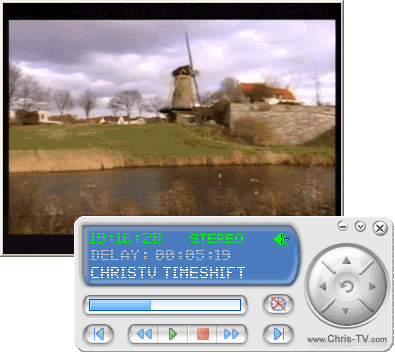
- There are 3 Timeshift Running Modes :
- Using software DV Encoder ( with high CPU usage and large size for buffer file )
- Using software MPEG Encoder ( only MPEG Intervideo Encoder 3 is supported for the moment )
- Using hardware MPEG Encoder ( available only for TV Cards with MPEG Hardware Encoding Module )
Note : ChrisTV TimeShift feature works only under Windows XP (MCE) with SP1 or higher.
- For software encoding TV Cards there is the option to mute the Preview Live Sound while in TimeShift Mode
( in Program Settings->ChrisTV Settings->Mute Preview Sound while using TimeShift )
- You can customize the TimeShift Buffering Time duration between 1 and 300 minutes ( while in trial mode the maximum duration is fixed to 35 minutes ).
- For a better usage and easy control of ChrisTV TimeShift, you can use the following Keyboard Keys (Winamp like).
- New Features and improved support for Hauppauge PVR series :
- You are able to change any setting of the MPEG Hardware Encoder like : Stream type, Video Bitrate, Audio Bitrate, Video Frame Size etc.
- MPEG Recording Presets have been added to help you choose faster the best MPEG recording settings.
- You can customize the Hauppauge Prefilter Settings for PVR 250/350 TV Cards models, so you'll get the best image quality.
- Live Preview has been optimized to work with all PVR series TV Cards.
- ChrisTV Scheduler has been improved, you have now the option to choose what ChrisTV should do after a recording task ends :
- Close ChrisTV,
- Close PC,
- Go in Standby Mode,
- Go in Hibernate Mode.
- Recording Profiles for MPEG Hardware Encoding Module have been added to ChrisTV Professional version only, where you can create, load, save and delete your custom profile settings.
- Teletext in new window (not overlayed) has been redesigned for a better usage.
- Detection of the MPEG Hardware Encoding module has been improved and optimized for Leadtek PVR 2000, Hauppauge PVR 150/150 MCE and other Blackbird models.
- TVgenial support has been optimized, also the scheduled task duration bug has been fixed, for tasks that end in the next day.
- ChrisTV Control Panel can be made visible while TV is in Fullscreen Mode, by moving the mouse in the lower area of the TV Window (Windows Taskbar area).
- ChrisTV Shareware versions have now a FREE Trial Period of 21 days.
- Some language files have been updated.
- Other small fixes and improvements.
|
|
25 February 2005
|
Version 4.20 ( 25 February 2005 )
- Support for Hauppauge PVR 150/250/350/500, ATI EHome Wonder and Leadtek PVR 2000 has been improved.
- Channel Automatic Scan module has been improved and optimized :
- Added new feature to Autoscan for Radio Stations.
- Added new option to save found channels into a new channel list or append to the existing channel list.
- Improved channel scanning and switching for some bt8x8 tv cards.
- If you don`t find any channel, you can change the TV Card Driver frequency tunning settings by pressing the "Advanced Settings..." button.
- Mosaic Mode has been improved and optimized, also now you can choose the number of channels to be displayed once : 2x2, 3x3, 4x4, 5x5.
- For better Channel Settings management, you can now maximize the Channel Settings Window.
- Improved Scheduler module : scheduled tasks will wake up your PC from Hibernation/Standby Mode.
- Improved detection of TV Cards with MPEG2 Hardware Encoding.
- Improved support for Hauppauge PVR 250/350 series - Live Preview Mode without MPEG2 Hardware Encoding.
- Added new option to reinitiliaze the Preview Graph, after you make a MPEG2 Hardware Recording, in order to fix some sound and video problems.
- For some TV cards with MPEG2 Hardware Encoding the Video Standard was not correctly set, now you can Force the TV Video Standard to PAL/NTSC in Program Settings->MPEG Hardware Encoding.
- Fixed a bug that prevented ChrisTV to start correctly for Windows Users that didn`t have admin rights.
- Improved detection of the Composite and S-Video inputs for TV Cards that have more than 1 input, like Hauppauge PVR 150/250/350/500 serie.
- Optimized the TVgenial support in ChrisTV.
- Fixed some bugs in MPEG Recording Module and new frame sizes : 640x480, 704x480 and 704x576 have been added.
- You can now send a ChrisTV Questionnaire or Error Report, without launching ChrisTV, by going to Start Button->Programs->ChrisTV->"Contact ChrisTV Support".
- Some language files have been updated.
- Other small fixes and improvements.
|
|
11 December 2004
|
Version 4.10 ( 11 December 2004 )
- We have added full support for common TV Cards with MPEG 1/2 Hardware Encoding, for the list of supported/compatible TV Cards, please check this page.
- The support for Winfast PVR2000, ATI All In Wonder, ASUS TV-FM and other similar TV Cards has been improved.
- Added support for TVgenial scripting interface, you can add/delete recording scheduled task directly from TVgenial, please check this page, for more details about the configuration steps.
- Removed the noise that appeared on channel changing for some TV Cards drivers.
- Added the option to change the Sound Mode (SAP) to other value by pressing the 'S' key.
- The image quality has been improved for TV Cards that have only Video Capture Pins - like Asus TV/FM, Winfast TV Card Series.
- Added a New option to Enhance the support for Combo Cards ( like ATI All In Wonders series ) has been added in Program Settings->Driver Settings->Advanced.
- ChrisTV Agent and Scheduler have been optimized and all know bugs have been removed.
- The Driver Settings window has been reorganized for a better usage.
- Optimized channel scanning for some tv cards.
- Added a new feature to Force Country changing according to the TV Channel Video Standard (useful for some TV Cards, when the cable provider is sending the channels in two or more Video Standards and you don't have sound on all channels.)
- Added a new plugin for controlling ChrisTV with ATI Remote Wonder 1/2.
- The Girder export file for controlling ChrisTV has been updated with all the new control settings, for more details please check our forum.
- Fixed Frame Size bug in MPEG Recording Module & other small bugs.
- Some minor fixes and improvements in the AVI Recording Module.
- Other small fixes and improvements.
|
|
22 October 2004
|
Version 4.05 ( 22 October 2004 )
- Fixed recording problem for TV Cards that have support for Audio Rendering through PCI.
- Added a new transparent OSD for the VMR9 Rendering Mode ( you can activate it in Program Settings->ChrisTV Settings )
- Fixed the scalling problem for ChrisTV Skin Control Panel and settings windows when using Display DPI settings different than Normal Size (96 DPI).
- Added the feature to activate/deactivate the Scheduled Tasks, so if you want to temporary disable a scheduled task you can do it by a simple click in ChrisTV Scheduler Window and there is no need to delete it.
- Channels switching time has been optimized.
- Fixed some settings in the MPEG Recording Module.
- Improvements in the AVI Recording Module.
- Other small fixes and improvements.
|
|
1 October 2004
|
Version 4.01 ( 1 October 2004 )
- Added the option to choose the Country in Quick Configuration Panel.
- Fixed some bugs in MPEG Recording Module.
- Fixed some sound initialization problems.
- Updated some language files.
- Other small fixes and improvements.
|
|
25 September 2004
|
"ChrisTV - The PVR that TAKES control OVER your TV Card."
Version 4.00 ( 25 September 2004 )
- Version 4.00 of this suite of products includes
the well known ChrisTV Standard and ChrisTV
Professional. ChrisTV Lite is the new member
of this suite, coming as a FREEWARE for non-commercial
use. ChrisTV Standard and ChrisTV Professional are available as shareware
with 30 days FREE trial period.
- ChrisTV can be controlled from now on easily also
through the ChrisTV Skinnable Control Panel introduced
in order to help our Users to TAKE control OVER their TV Cards, with
just a simple mouse click.
- In order to configure ChrisTV and optimize your
TV Card settings a Configuration Wizard has been added in Professional
and Standard versions.
- Now you can record live TV or convert your favourite VHS Tapes
directly to MPEG 1 or MPEG 2 files, by using the MPEG Recording
Module ( Registered MPEG 1/2 filters required to be installed)
with many recording presets ( for example DVD, SVCD, VCD etc. )
- In ChrisTV Professional you can customize the
MPEG Recording Settings such as MPEG type, video
& audio bitrate, frame size, frame rate etc.
- Video Frame Cropping filter for AVI and MPEG recording
has been added to let ChrisTV users crop the video frame to a specified
frame size or to remove undesirable frame lines in the captured files
(available in Professional version only)
- ChrisTV Scheduler has been improved and offers
our users the option to choose the Scheduled task type between : Once,
Daily and Weekly. Also you are able to set the name
for the recorded file.
- Once : the scheduled task will be only once, at the
specified time and date.
- Daily : the task will occur each day or at specified
days interval, at the specified time and date.
- Weekly : you can choose the day of the week when you
want to schedule the task.
- ChrisTV Agent has been optimized to work with
the new scheduler features.
- Recording profiles added for saving MPEG and Radio/Audio
recording settings (available in Professional version only)
- Image Capture and Mosaic Mode
have been optimized to work correctly with TV Cards and Combo Cards
that have only Capture Pin.
- The support for ATI All in Wonder TV Combo Cards has been improved.
- Auto-scanning by channel number feature has been
improved for some countries.
- Auto-scanning channel tables have been updated.
- Added the option to Reset ChrisTV Windows positions,
useful when you use multimonitor enviroments, the feature is available
in ChrisTV Quick Configuration Panel.
- Some minor fixes and improvements in the AVI recording
module.
- Other small fixes and improvements.
Registered Users of ChrisTV version 3.xx have FREE upgrade to version 4.00, for more information please read this topic.
|
| 6 July 2004
|
Version 3.80 ( 6 July 2004 )
- The support for graphic cards with Video Input (VIVO) and combo cards (Graphic & TV Card) like ATI All in Wonder Radeon series and Nvidia Cards has been improved. For more information about this issue please check ChrisTV F.A.Q.
- Added a new option "Use Advanced Rendering Mode" to improve the image quality on TV Cards that have only the capture pin (like Asus TV/FM and Combo Cards).
- The support for Intel HyperThreading CPUs and AMDs CPUs above 2600 Mhz has been improved, there should be no more Windows fatal errors on ChrisTV launch :)
- The bug that prevented on some setups the Windows Shutdown, while ChrisTV was running, has been removed.
- Improved the autoscanning by channel number for people living in USA and Canada ( channel mapping - syncronize channel name with the channel number )
- ChrisTV launching and closing time have been improved, due to optimizations that were made to the channels list loading/saving procedures.
- The Channels Settings window can now be resized, in order for the user to see all channels settings from the list.
- Added the feature to use custom TV Icons/Logos, if you want to find the TV Icon faster just type their name in the tv logo edit box.
In order to add custom tv icons, you have to place your favourite TV Icon (picture format: BMP, 32x16), into ChrisTV\TV Icons" folder and restart ChrisTV to refresh the icon list.
- You can now select for each channel if it's active (favorite) or not. In the Channels List Popupmenu only active channels will be listed, also the up/down arrow keys (channel +/-) will navigate only through the Active/Favorite Channels ( but this feature can be disabled, if you want, in Program Settings->ChrisTV Settings).
- The channel switch time has been improved, it's faster than ever :).
- Some minor fixes and improvements in the recording module.
- Added the option to sort the scheduled task by Date & Time of occurrence.
- The position of the TV Window on setups with multimonitor displays will be saved/restored correctly ("Enable Mutimonitor Feature" must be checked).
- The channel list import/export feature has been fixed, should work without any problems, no matter what GUI language is used.
- The popup channel list can be customized : you can hide the channel number and set the number of channels per column.
- Added the feature to Use TV Card Audio Output through the WDM driver (in Program Settings->Driver Settings), available for TV Cards based on Philips SAA713x chipset ( in this case you won`t need anymore the line in connection).
- Added the option to disable the Nero QuickTime Filters while ChrisTV is running, enable this option if you have problems starting ChrisTV after you have upgraded Nero to versions above 6.3.1.15.
- Added the option to disable the mouse cursor autohide while TV Window is in fullscreen.
- Other small fixes and improvements.
|
| 15 May 2004
|
Sistemul de Vânzăre în România a licentei programului ChrisTV a fost lansat, pentru mai multe detalii va rugam sa cititi informatiile prezentate : Vânzări în România.
Version 3.70 ( 15 May 2004 )
- NEW Automatic Channel Scanning 'by frequency', where you can choose the frequency interval and the step (0.25, 0.50, 0.75, 1.00, 2.00, 5.00, 7.00, 8.00 mhz) of the automatic scan.
- Improved the automatic channel scanning 'by channel number' and 'by channel table'.
- Added the option to schedule audio (radio&tv) recording tasks - only in Professional Version.
- MSI TV @nywhere Cards are fully supported now, for more details on configuring check ChrisTV forum
- The recording module has been optimized and all known bugs have been removed.
- In order to help our users to find the solutions to common problems we have added a new Settings Window - ChrisTV Tips & Troubleshooting.
- ChrisTV Settings Window has been reorganized.
- Added the option to hide the ChrisTV Takbar button if TV Window is set "Always on Top".
- ChrisTV Driver Settings Window has been reorganized.
- Added the option to reInitialize the WDM Driver on ChrisTV start, in order to fix some problems related to : noise (or no proper sound) - Medion TV Cards,no channel detection on channel autoscan or wrong video standard used on ChrisTV launch.
- Added the option to use a special channel frequency tunning for some TV Cards, like MSI TV @nywhere Cards.
- Improvements and fixes in the Zoom Module, on some cases the zoom wasn't set corectly after ChrisTV restart when Deinterlace Filter or Image Processing filter was enabled.
- You can now Zoom to the center of the image by holding down CTRL key and using mousewheel in order to zoom in or out.
- Added the option to Disable Video Renderer while using Radio Mode, so the CPU ocupancy will be lower, but the channel switch time between TV Mode and Radio Mode could increase.
- Added the feature to export and import the ChrisTV Channel List to *.chl files.
- Added the option to hide the channel number in the popupmenu channel list and in the TV OSD.
- Added the option to choose the Clock Time Format for the OSD Clock.
- Sleep Timer/Shutdown Function should work properly on all PC's configurations now.
- Other small fixes and improvements.
Note: In ChrisTV 3.70, more Preview Formats/Frame Sizes have been added in order to be compatible with NTSC standard and MPEG1/2 standards. There could be some image quality issues for users updating from previous versions, if so please go to Program Settings->Video Rendering and Set the "Preview Format" to a correct value (like 768x576, 640x480 for PAL), same thing could happen when using custom recording profiles.
|
| 13 April 2004
|
After intensive testing with the help of our beta testers, we have found a solution to tune corectly any frequency on MSI TV @nywhere Cards.
Please check ChrisTV Forum, for more details on how to make ChrisTV Software work with your MSI TV @nywhere Cards.
|
| 16 March 2004
|
On some software configurations it seems there are some problems when you launch an option from the ChrisTV Agent menu. If you have problems with ChrisTV Agent, please check this forum topic and update your ChrisTV_Agent.exe file.
Version 3.60 ( 15 March 2004 )
New Features
Added ONLY to Professional version :
- Advanced Recording settings, during recording you can use deinterlace filter and image processing filter, also in order to save some CPU power you can now disable the preview mode while recording.
- Recording Profile Settings where you can create, load, save and delete your customized recording profile settings.
Added to Professional and Standard versions :
- ChrisTV Scheduler (For detailed information check Scheduler Information)
- The type of the Video Compression Codecs is now determined automatically : [ds] - DirectShow Video Codecs and [vfw] - Video For Windows Codecs (VCM).
- Sleep Timer feature has been added and works like the one you have on your real TV. The Sleep timer can be set to : 15, 30, 45, 60, 90, 120, 240 minutes countdown till computer shutdown.
- You can set a custom background for the Radio Stations (jpeg or bmp files).
- The automatic scanning by channel number has been improved for some countries.
- You can set the preview size of the video window to 40x30 size by pressing CTRL-0.
Fixes and Improvements:
- The settings button of Video Compression Codecs should
work corectly with all types of Video Compression Codecs ([ds]
and [vfw]).
- The image capturing window has been rearanged for an easy usage.
- There should be no error messages like "List index out of bounds (-2)" when you use plug&play sound devices.
- Improvements and fixes to the mosaic mode, especially when the deinterlace filter is used.
- The language files have been updated.
- The ChrisTV load time is more faster.
- And other minor bugs fixed.
ChrisTV - Frequently Asked Questions (F. A. Q.) has been updated.
|
| 2 December 2003
|
Version 3.55 ( 2 December 2003 )
- ChrisTV is now developed by Chris P.C. srl company.
- Added Audio Recording option - you can record your favourite fm radio or tv (only audio) shows in WAV file format using all compatible audio codecs installed on your PC. (option available only in Professional version)
- ChrisTV works corectly now when the user PC has more than 1 sound card.
- Added the option to Clear the Channels List.
- Fixed the bug when the window aspect ratio was not set corectly when using dscaler filters.
- Added a play button, so now you can watch easily the files recorded with ChrisTV.
- Some language files have been updated.
- A lot of improvements & fixes were made.
|
| 11 November 2003
|
Patch for ChrisTV 3.51 ( 11 November 2003 )
Bug fixed : ChrisTV did not start (or had an error on start) on some CPUs.
You need to download the patch file ONLY if you encountered the mentioned bug.
ChrisTV.exe file ( version 3.51a )
Just overwrite the ChrisTV.exe from the ChrisTV 3.51 folder with the new ChrisTV.exe file.
|
| 8 October 2003
|
Version 3.51 ( 8 October 2003 )
- Some bugs were fixed in the recording module.
- Improved the channel autoscan on some countries.
- Some language files have been updated.
- Added new language files : Albanian, Bosnian, Macedonian, Serbian, Thai.
- Other small bugs were fixed.
|
| 19 September 2003
|
New site design for www.chris-tv.com and added a new faster and better forum.
After almost 5 months of intensive work and beta testing, we release today ChrisTV 3.50 - Shareware 30 Day Trial Version with some recording limitation as Standard and Professional versions.
Do not install ChrisTV 3.50 in the same folder as previous ChrisTV versions.
Version 3.50 (19 September 2003)
- Starting with version 3.50, ChrisTV is no longer a freeware software :( It's shareware, check the purchase page on www.chris-tv.com for details.
- Recording feature has been added to ChrisTV, you can use any video/audio compression codec installed on your PC.
- Standard version will record only from TV Tuner Capture Devices.
- Professional version will record from any Capture Devices installed, like TV Cards, Webcams, Video (TV) In Cards, Cameras.
- Added Radio-FM support (works only on TV Cards with RadioFM support)- still experimental - if you set a FM Frequency that you know it works and is only noise (no proper sound) then choose in Audio Input box between Tuner In or Line In (for each radio station).
- Now you can add as channel the composite input and s-video input.
- Added Image Processing Filter (only available in ChrisTV Professional version), it will not work in recording mode for the moment. You can apply video effects : red, green, blue, darken, invert, blur, gray, and emboss effects.
- Image Capture works now faster and is more stable.
- Now you can autoscan using 2 methods : by frequency (channel tables) or by Channel Number (use Scan Mode button for switching between the 2 modes)
- Added support for adjusting the frequency of a channel using the channel number.
- Now there is an option for each channel to set the sound mode : Auto, Mono, Stereo, Dual.
- Channels window has been redesigned in order to be more easy to add/scan/finetune channels.
- Added support for ATI All in Wonder 9800 with original WDM Drivers, the no sound bug has been removed. :)
- Dscaler Deinterlace Filter is no longer in the ChrisTV 3.50 Package, you can download it from here and install it (please check the readme.txt file for installation instructions).
- Updated the ChrisTV Help file :)
- More than 200 TV logos.
- 4 New language files have been added to ChrisTV package : Danish ( Thanks to Payne ), French ( Thanks to BlindMan & Drizzt ), Spanish (Thanks to Sergio Baretto), Ukrainian (Thanks to Andrew aka "Palych" Burtyk & Alezz).
- A lot of improvements & fixes were made.
|
| 9 June
2003 |
|
Patch
ChrisTV 3.20+
Download this only
if the sound dissapears (in 1-2 sec) after switching from a
channel to another channel (The detection of sound mode
stereo/mono has been removed in this Patch 3.20+, because of
some drivers (IULabs and other) that don't detect correctly
the sound modes). For more info check this post on the ChrisTV Forum. |
| 26 April
2003 |
Version 3.20 (26 April 2003)
- Adding the first
version of the ChrisTV Help file :)
- Introducing Support
for DScaler Deinterlace Plugin for a better image quality,
but with greater CPU Usage (module still in testing)
- ChrisTV detects now
if the current channel is received stereo or mono.
- Extended the Mouse
Wheel support - Middle button navigates through bottom
property bars and with a single click on the bar you can
change the image or sound property.
- OSD Panel is
available again and can be used only if "Use Video Renderer
Mixer (VMR-9)" option is enabled.
- Image Capturing and
Mozaic Mode are available for all video rendering
modes(Overlay, Video Mixing Renderer, and normal video
rendering).
- Teletext Mode is now
available, but might still not work at the moment with all
TV Cards.
- New functions added
: Zoom, Aspect Ratio, Predefined Video Window Sizes.
- New TV Logos added :
50 (Thanks to Csabi), 5 (Thanks to Ramon D Diaz ), 4 (Thanks
to Neil Clark).
- 5 New language files
have been added to ChrisTV package : Czech (Thanks to Jan
Drbohlav), Polish (Thanks to ARtek), Russian (Thanks to
Bizov Andrey), Italian (Thanks to Andrea Bonaiuto), Turkish
(Thanks to Erdem TEKSEN).
- A lot of
improvements & fixes were made.
|
|
|
Other Products |




|
 ChrisTV NOW! ChrisTV NOW! |
49.95 EUR
for Professional
|
39.95 EUR
for Standard
|
Add-On Packages
for ChrisTV Lite
|
|
ChrisTV Downloads |
Professional :
|
Standard :
( ChrisTV Trial Limitations )
|
|
Testimonials |
"Thank you so very much for your quick response. It is a real pleasure working with someone like you! So often other companies are not as responsive. I am going to purchase your program which I think is SUPER!"
Milan Z., U.S.A
"It's one great program you have here. I only wish that manufacturers of TV cards would realize they're not making any friends by distributing substandard TV software with their products. Yours is most definately superior."
Ron M., Canada
"I just wanted to say thank you for continuing to support your software over the months that I have owned a registered copy. The steady development and addition of features to this great program is the way software should be designed!"
Lee R., U.S.A
"I like it, good and stable. Also easy to use."
Bill G., UK
"Thank you very much. I've never bought a program as fast as I did with yours. It's a great piece of software. I didn't know it until yesterday. Downloaded it, tried it, bought it ! Great and sharp view, fantastic features !"
Aben B., Netherlands
"This kind of customer service is the main reason I support shareware, keep up the good work!"
Martin C., Ireland
"It's the best i've ever seen! This program should be bundled with every tv card!"
John P., USA
"Thanks for your help and wish you succes with the further development of your program. It is a real nice program with a very good look and feel principle and strong in specially the channel scan and channel adjusting possibilities (better than Vodio and Powercinema)"
Herman V., Netherlands
"Great software! I was really sad to see my old programs didn't work with the Medion card / Philips SAA7134. But then I found ChrisTV and the world was o.k. again ;))"
Ronny T., Germany
"Outstanding. I get a better picture quality from your software."
Nick F., UK
"Awesome ! Much better then the software supplied with tv card."
Jacob V., Netherlands
"Absolutely Brilliant !!! Why can't Pinnacle, Aver and Power do software like this ?"
Paul R., UK
"It's great....picture quality is awesome, way better than windvr from intervideo."
Vinod T., Canada
"It's way better than Pinnacle's own software and is becoming more perfect with every new release."
Tom S., Netherlands
"IT WORKS! I have looking about 2 months for software that supports my tv tuner and Your soft WORKS! You rule man!"
Lukasz M., Poland
|
| 
 Del.icio.us
 Digg it
 StumbleUpon
 Yahoo MyWeb
 Google
 Furl it